Issue with OP Entry Delay and Failures in LinuxCNC + EtherCAT System

More
1 year 6 months ago #327229 by papagno-source
Please , i want understand :

If remain refclocksynccycles = -1 in xml file, can have some problem on real machine ?

Please Log in or Create an account to join the conversation.
More
1 year 1 month ago #334311 by wankoran
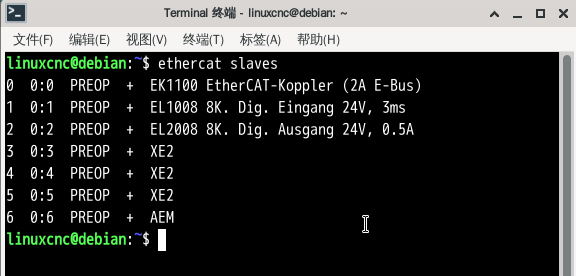
I also encountered exactly the same problem. With the same hardware, the only differences were debian10+ethercat1.5 and debian12+ethercat1.6

Please Log in or Create an account to join the conversation.
More
1 year 1 month ago #334312 by wankoran
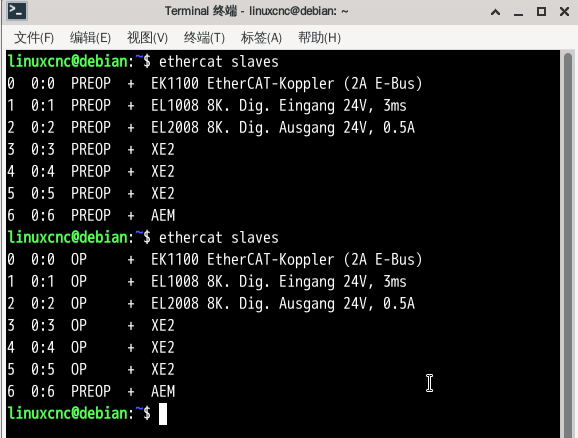
In addition, I also found that when using debian12 and ethercat1.6, some drives, such as copley, will directly enter op mode after the computer is turned on, regardless of whether linuxcnc is turned on or not.

Please Log in or Create an account to join the conversation.
More
1 year 1 month ago #334324 by wankoran
 I'll correct the previous description.

When the machine is turned on, the drives are all in the preop state


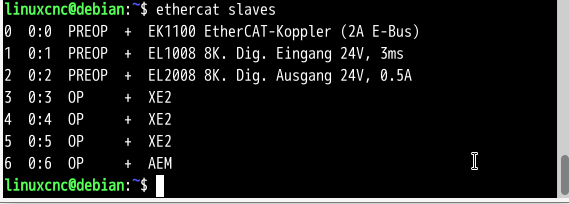
Then I opened linuxcnc and found that the status of several drives had not changed from preop to op, Moreover, even when in the op state, the drives of these copley cannot be controlled.
 

After shutting down linuxcnc, the status of these copley drives still remained at op
 

debian12+ethercat1.6.7 dmesg
 

File Attachment:

File Name: debian12et...mesg.txt
File Size:30 KB


debian10+ethercat1.5.2 dmesg
 

File Attachment:

File Name: debian10et...mesg.txt
File Size:1.92 KB

Please Log in or Create an account to join the conversation.

More
1 year 1 month ago #334325 by wankoran

 I'll correct the previous description.

When the machine is turned on, the drives are all in the preop state


Then I opened linuxcnc and found that the status of several drives had not changed from preop to op, Moreover, even when in the op state, the drives of these copley cannot be controlled.
 

After shutting down linuxcnc, the status of these copley drives still remained at op
 

debian12+ethercat1.6.7 dmesg
 

File Attachment:

File Name: debian12et...mesg.txt
File Size:30 KB


debian10+ethercat1.5.2 dmesg
 

File Attachment:

File Name: debian10et...mesg.txt
File Size:1.92 KB
Although the network cards of the two PCs tested this time are different, I have tested exactly the same network card, and these problems still exist.
 

Please Log in or Create an account to join the conversation.

More
1 year 1 month ago #334326 by Hakan
Lots of errors there.
Maybe you should try disconnect most devices and test with only EK1100 and EL1008, that's combination that should work.
First error is "Can not calculated topology" or something like that. Cabling ok?

Please Log in or Create an account to join the conversation.

Time to create page: 0.214 seconds
Powered by Kunena Forum
