New Trajectory Planner - Testers/programs wanted

More
12 years 9 months ago #42524 by Todd Zuercher
I think you guys working on this are defonately on the right track. It can offer a significant improvement depending on the code used.
I wish that it would be possible to easily extend this to other axis beyond XYZ.
Several of the routers we use have double vertical axis with 2 spindles using Z and W. The new traj planner shaved a min off running the code included (went from 4.5 to 3.5) That was nearly a 25% improvement.

Using the G64P0.005 vs G64P0.005Q0.005 difference was less significant on the new planner run times were, 3:37 vs. 3:30.

PS The same carving with the W code (W is identical to Z) takes about 6 minuts using either planner.

Maybe I need to try harder to build a ZZ configuration that will work for us.

Thanks again I will be playing with this some more.

Please Log in or Create an account to join the conversation.

More
12 years 9 months ago #42528 by skunkworks
Sure - this is just the start. it does circular blending for xyz at the moment. He hopes to do abcuvw.

sam

Please Log in or Create an account to join the conversation.

More
12 years 9 months ago #42547 by Todd Zuercher
I know that the axis A-W don't are not included in the new planner (yet). But I did notice some sort of bug there.
When running with the new traj, planner installed and using the the Z and W axis, the W was over shooting some of it's moves.
See the attached pictures.

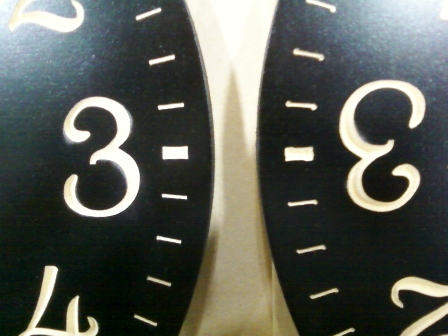
Picture of Z carving Old on left, New on right.


Picture of W carving Old on left, New on right.


Both W and Z were carved at the same time using the same code on the same machine, new planner first old planner second. Both runs took approximately the same amount of time

Please Log in or Create an account to join the conversation.
More
12 years 9 months ago #42549 by skunkworks
awesome! well - not awesome but this is the stuff we are looking for.

Is the program you posted above exhibiting this issue?

sam

Please Log in or Create an account to join the conversation.

More
12 years 9 months ago #42552 by skunkworks
Better yet - could you isolate a short snippit of gcode that does it?

I am playing with the axis xyzabcuvw config and am not seeing it in the preview. Do you see it in the preview also?

thanks
sam

Please Log in or Create an account to join the conversation.

More
12 years 9 months ago - 12 years 9 months ago #42558 by Todd Zuercher
The the g-code programs posted above are these same carvings.

I do not see it in the preview, mostly because the W axis is not realy shown in the preview.

This machine configuration is a servo set up, and the problem might be magnified by a tuning issue. But I kind of doubt it since it doesn't show up with the old planner.

In the above g-code 130207LWZ.ngc the first errors start to be seen around line #13-15 and #17-19. That is the first tick carved on the clock face. The problem is visible on all of the ticks arround the clock. With the same mistake on the same corners of each one. This first tick begins the carving at the top left corner and continues clockwise around the shape. the 2nd and 4th corners carved are the ones where the mistake is seen.

Sraingly enough the very last thing carved in the file is the tick right next to the very first one. This one starts at the corner farthest left, then continues clockwise. So that the 2nd corner carved is the one that was carved 1st on the very first tick. On this last tick the errors are seen on the same corners as the first one, but are the corners that are carved 1st, 3rd (and last it finishes where it started) are where the error is seen.
Last edit: 12 years 9 months ago by Todd Zuercher.

Please Log in or Create an account to join the conversation.

Time to create page: 0.481 seconds
Powered by Kunena Forum
