
Ethercat random jitter fix
- tommylight
-

- Offline
- Moderator
-

Less
More
- Posts: 21957
- Thank you received: 7478
22 Apr 2026 03:33 #345829
by tommylight
Replied by tommylight on topic Ethercat random jitter fix
You mean 6.12 for sure, 5.12 is also pretty old.It makes no sense to roll back to a version built for kernel 2.6 (Trixie's is 5.12) that's not been touched for 7 years...
The following user(s) said Thank You: rodw
Please Log in or Create an account to join the conversation.
- grandixximo
-
 Topic Author
- Away
- Platinum Member
-

Less
More
- Posts: 339
- Thank you received: 406
22 Apr 2026 06:18 - 22 Apr 2026 06:22 #345831
by grandixximo
Replied by grandixximo on topic Ethercat random jitter fix
Fair point on the age of the base, but it is not as stale as the "1.5.2" label makes it look. YangYang's build sits on the 1.5.2 API boundary, but a lot has been grafted on top of it. Martin Ribalda's refactor moved the slave scan, slave config, SDO request, dictionary, and state-change FSMs into per-slave state machines running off externally supplied datagrams, which means every slave progresses through INIT to PREOP to SAFEOP to OP in parallel instead of the master FSM walking them one at a time. That is where the OP speedup comes from, not the age of the base. On top of that there is an SDO injection path, so CoE transfers ride on the realtime cycle alongside PDOs and startup list SDOs plus PDO mapping writes do not each cost a full master FSM round trip. The 1.6 era API surface is mostly backported too (ecrt_master_sync_reference_clock_to, mbox gateway, rescan, RT slave request hooks, full FoE request API, reboot FSM, bulk register read/write, SII from file, and so on).
On the kernel side, the native drivers have been updated for modern kernels. The devices/ tree ships 6.12 variants of igb, igc, r8169, genet, e1000, e1000e, and stmmac, and DKMS builds cleanly against Trixie's 6.12 headers.
I tried the obvious "just tune 1.6.9" route first. Applying the same constants YangYang's build uses (EC_WAIT_SDO_DICT=0 and EC_SKIP_SDO_DICT=1) on top of stock 1.6.9 drops OP from around 15 s to around 12 s. YangYang's build reaches OP in roughly 5 s on the same bus. The remaining gap is not a constant that anyone can tune; it is the per-slave FSM architecture, and 1.6.9 does not have it. 1.7 does not have it either, I checked, master/fsm_slave.c is still 685 lines in 1.7, the same as in 1.6.9, against 1339 lines in YangYang's build.
So "use the newer version" is the intuitive answer but it does not actually close the gap. Porting Ribalda's refactor cleanly onto 1.6.9 is weeks of work with a large regression surface. Shipping YangYang's build with modern Debian packaging gets working fast OP debs this week. Different tradeoff, not a rollback.
OP transition time is of course unrelated to grinding itself, this is about how long the user waits for the machine to come up, not motion behavior.
On the kernel side, the native drivers have been updated for modern kernels. The devices/ tree ships 6.12 variants of igb, igc, r8169, genet, e1000, e1000e, and stmmac, and DKMS builds cleanly against Trixie's 6.12 headers.
I tried the obvious "just tune 1.6.9" route first. Applying the same constants YangYang's build uses (EC_WAIT_SDO_DICT=0 and EC_SKIP_SDO_DICT=1) on top of stock 1.6.9 drops OP from around 15 s to around 12 s. YangYang's build reaches OP in roughly 5 s on the same bus. The remaining gap is not a constant that anyone can tune; it is the per-slave FSM architecture, and 1.6.9 does not have it. 1.7 does not have it either, I checked, master/fsm_slave.c is still 685 lines in 1.7, the same as in 1.6.9, against 1339 lines in YangYang's build.
So "use the newer version" is the intuitive answer but it does not actually close the gap. Porting Ribalda's refactor cleanly onto 1.6.9 is weeks of work with a large regression surface. Shipping YangYang's build with modern Debian packaging gets working fast OP debs this week. Different tradeoff, not a rollback.
OP transition time is of course unrelated to grinding itself, this is about how long the user waits for the machine to come up, not motion behavior.
Last edit: 22 Apr 2026 06:22 by grandixximo.
The following user(s) said Thank You: endian
Please Log in or Create an account to join the conversation.
- papagno-source
- Offline
- Elite Member
-

Less
More
- Posts: 170
- Thank you received: 13
22 Apr 2026 07:52 #345832
by papagno-source
Replied by papagno-source on topic Ethercat random jitter fix
Good morning everyone, and sorry if I'm less present, but technical support won't let me go. I personally think we need to focus on functional solutions; it's pointless to use a LinuxCNC, which is very modern but doesn't work. So I agree with Grandixximo. In the next few days, I'll do the tests Grandixximo asked me to do and I'll update you. I'll ask the customer if he'll let me do further tests outside of business hours. The machine is working properly with Debian 10. I remind you that I tried overwriting the lcec_conf and lcec.so files from Debian 10 to Trixie, but I didn't see any improvements. That's why I believe the problem, aside from those found by Grandixximo and fixed, isn't Lcec, but rather Ethercat and the kernel, which has high jitter for a CNC machine. The solutions are to use a PC suitable for RT or design a Master Hw that has a dual Port RAM, capable of buffering information and letting the PC breathe.
Please Log in or Create an account to join the conversation.
- rodw
-

- Offline
- Platinum Member
-
Less
More
- Posts: 12156
- Thank you received: 4149
22 Apr 2026 09:59 #345834
by rodw
Replied by rodw on topic Ethercat random jitter fix
Sorry I don't buy the excessive latency with Trixie today vs Debian 10, which was in the 2016 to 2017 era back when I started. That's 10 years ago. There was no PREEMPT_RT kernel available at that time. In fact, you could have been running the RTAI kernel. Back in 2017, the path I followed that was subsequently documented by cncbasher was to Install Linux Mint 17.x or 18.x and compile the PREEMPT_RT kernel. Ref: forum.linuxcnc.org/9-installing-linuxcnc...linuxcnc-from-source. Not long after this somebody made an ISO on Debian (10) Stretch which included PREEMPT_RT. Eventually, there was an official stretch release.
Bullseye (Debian 11) was released and that obsoleted Python 2.7 which we depended on. That was such a big stumbling block we did not Release anything on Bullseye but I used it to get network drivers for my Odroid H2+ instead of compiling from source. I had to give up Mint at this time because their kernels were too dated to have my drivers. I will never use anything other than Debian now! There was some big changes to the linux kernel network drivers in the 5.9 kernel pending the release of Bullseye on Kernel 5.10. I had one Ethercat machine running Bullseye (11) and moved to Bookworm (12) and got stuck on all PC's I had with Error Finishing Read on Mesa hardware but never had issues with Ethercat in my bench testing. This is when I started working on kernel tuning and I found that my Old 2017 PC (Celeron J1900) had significantly improved jitter on Bookworm then it did back in the day. (eg reduced from 130k to 40k or lower). I don't think Trixie would be any worse. In fact other PC's I've tuned are running at almost half the latency now before tuning. Here is an example from Mike after he applied my optimisations
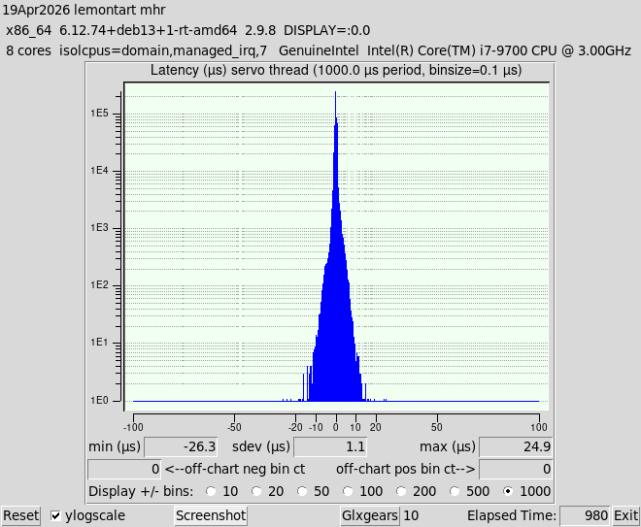
This is way below minimum latency requirements for Ethercat. There is no doubt in my mind that any issues being discussed here is due to misconfiguration or issues in the Ethercat environment. Please forget all about latency. It is not an issue if the correct drivers are deployed and the appropriate network tuning has been done (Which it is for papagno-source's PC's).
Bullseye (Debian 11) was released and that obsoleted Python 2.7 which we depended on. That was such a big stumbling block we did not Release anything on Bullseye but I used it to get network drivers for my Odroid H2+ instead of compiling from source. I had to give up Mint at this time because their kernels were too dated to have my drivers. I will never use anything other than Debian now! There was some big changes to the linux kernel network drivers in the 5.9 kernel pending the release of Bullseye on Kernel 5.10. I had one Ethercat machine running Bullseye (11) and moved to Bookworm (12) and got stuck on all PC's I had with Error Finishing Read on Mesa hardware but never had issues with Ethercat in my bench testing. This is when I started working on kernel tuning and I found that my Old 2017 PC (Celeron J1900) had significantly improved jitter on Bookworm then it did back in the day. (eg reduced from 130k to 40k or lower). I don't think Trixie would be any worse. In fact other PC's I've tuned are running at almost half the latency now before tuning. Here is an example from Mike after he applied my optimisations
This is way below minimum latency requirements for Ethercat. There is no doubt in my mind that any issues being discussed here is due to misconfiguration or issues in the Ethercat environment. Please forget all about latency. It is not an issue if the correct drivers are deployed and the appropriate network tuning has been done (Which it is for papagno-source's PC's).
Attachments:
The following user(s) said Thank You: grandixximo, endian, NWE
Please Log in or Create an account to join the conversation.
- papagno-source
- Offline
- Elite Member
-
Less
More
- Posts: 170
- Thank you received: 13
22 Apr 2026 13:08 - 22 Apr 2026 13:26 #345838
by papagno-source
Replied by papagno-source on topic Ethercat random jitter fix
The comparison I'm making is about latency between Debian 10 with Kernel 4.19-27-rt and Debian Trixie Kernel 6.12.74-RT. Although Trixie's Grub has different optimization strings and Debian 10 has no optimizations at all, Debian 10 has half the jitter of Trixie on the same PC. Debian 10 has a jitter of 40 microsec and Trixie 85 microsec. So, since I want to do a further test with a new PC, can you advise me on which motherboard and processor would have the lowest jitter?
Last edit: 22 Apr 2026 13:26 by papagno-source.
Please Log in or Create an account to join the conversation.
- papagno-source
- Offline
- Elite Member
-
Less
More
- Posts: 170
- Thank you received: 13
22 Apr 2026 13:23 #345839
by papagno-source
Replied by papagno-source on topic Ethercat random jitter fix
The comparison I'm making is about latency between Debian 10 with Kernel 4.19-27-rt and Debian Trixie Kernel 6.12.74-RT. Although Trixie's Grub has different optimization strings and Debian 10 has no optimizations at all, Debian 10 has half the jitter of Trixie on the same PC. Debian 10 has a jitter of 40 microsec and Trixie 85 microsec. So, since I want to do a further test with a new PC, can you advise me on which motherboard and processor would have the lowest jitter?
Please Log in or Create an account to join the conversation.
- papagno-source
- Offline
- Elite Member
-
Less
More
- Posts: 170
- Thank you received: 13
22 Apr 2026 18:54 #345846
by papagno-source
Replied by papagno-source on topic Ethercat random jitter fix
Greetings everyone. Today I went to the customer's office after the company closed at 5 pm. I just got back at 8:30 pm. I had the chance to do some more testing, and I have to agree with Grandixximo.
I don't know why, perhaps I was in a hurry to not down the customer's machine for too long, and I made some mistakes.
The jitter results:
Debian Trixie, kernel 6.12.74-rt, latest Grandixxmo patch, Grub command line optimization (isolcpus, etc.) with 4 glx files open, 2 browser windows open, full-screen window movements, switching between different desktops, max jitter 65 microseconds.
The machine with refClockSyncCycles=-1 normally doesn't emit any noise, except for some window movements.
With refClockSyncCycles=1, it emits some noise.
With both refClockSyncCycles=-1 and 1, the command
ethercat upload -p 0 -t uint16 0x1C32 0x01 returns 0x0002 2
Pin pll-error oscillates around -1200 to 1300
Pin pll-out oscillates -5 to 5
I tried the commands:
ethercat upload -p 0 -t uint16 0x1C32 0x02
ethercat upload -p 0 -t uint16 0x1C32 0x03
ethercat upload -p 0 -t uint16 0x1C32 0x05
but it returns the error failed to upload sdo : no buffer space available
Debian Buster, kernel 4.19-27-rt, no optimizations on the Grub command line, with 4 glx files open, 2 browser windows open , full-screen window movements, switching between desktops, max jitter 95 microseconds.
With the same Grub optimizations as Trixie, max jitter is 75 microseconds.
With refClockSyncCycles=1, it easily emits noise.
With refClockSyncCycles=-1, it works flawlessly and without Grub optimizations, which with GRUB optimizations
pll-err pin from -1800 to 2000
pll-out pin oscillates with only two values: either -1000 or 1000
So I deduce that even Trixie has lower jitter than Debian 10, but for some reason, Debian 10 lets my machine work and Trixie doesn't.
I don't know why, perhaps I was in a hurry to not down the customer's machine for too long, and I made some mistakes.
The jitter results:
Debian Trixie, kernel 6.12.74-rt, latest Grandixxmo patch, Grub command line optimization (isolcpus, etc.) with 4 glx files open, 2 browser windows open, full-screen window movements, switching between different desktops, max jitter 65 microseconds.
The machine with refClockSyncCycles=-1 normally doesn't emit any noise, except for some window movements.
With refClockSyncCycles=1, it emits some noise.
With both refClockSyncCycles=-1 and 1, the command
ethercat upload -p 0 -t uint16 0x1C32 0x01 returns 0x0002 2
Pin pll-error oscillates around -1200 to 1300
Pin pll-out oscillates -5 to 5
I tried the commands:
ethercat upload -p 0 -t uint16 0x1C32 0x02
ethercat upload -p 0 -t uint16 0x1C32 0x03
ethercat upload -p 0 -t uint16 0x1C32 0x05
but it returns the error failed to upload sdo : no buffer space available
Debian Buster, kernel 4.19-27-rt, no optimizations on the Grub command line, with 4 glx files open, 2 browser windows open , full-screen window movements, switching between desktops, max jitter 95 microseconds.
With the same Grub optimizations as Trixie, max jitter is 75 microseconds.
With refClockSyncCycles=1, it easily emits noise.
With refClockSyncCycles=-1, it works flawlessly and without Grub optimizations, which with GRUB optimizations
pll-err pin from -1800 to 2000
pll-out pin oscillates with only two values: either -1000 or 1000
So I deduce that even Trixie has lower jitter than Debian 10, but for some reason, Debian 10 lets my machine work and Trixie doesn't.
Please Log in or Create an account to join the conversation.
- rodw
-
- Offline
- Platinum Member
-
Less
More
- Posts: 12156
- Thank you received: 4149
22 Apr 2026 20:12 - 22 Apr 2026 20:14 #345851
by rodw
Replied by rodw on topic Ethercat random jitter fix
Thanks for confirming that jitter itself is not the issue. This was expected with my tuning in place..
One of the difficulties with Ethercat, is that there are no IP addresses on the network to test network latency against. If this was a Mesa card, we would do that with sudo chrt 99 ping -i .001 -c 600000 -q 10.10.10.10 Perhaps there is an alternative method.
I think it can be assumed on a properly tuned Ethercat Intel NIC (like yours) that network latency is not a factor. Ethercat has an inherent advantage over Mesa because of its customized network protocol that uses significantly less bandwidth due to smaller packet sizes. The main network latency culprit is coalescing which has been disabled, SMP affinity has been used to ensure the NIC interrupt is running on the same core as Linuxcnc and a number of other optimisations that could introduce network latency have been tamed.This is confirmed where we see a substantial tightening of the Standard Deviation in before and after latency-histogram tests (more than halved from 2.3 to 1.1 usec on Mike's PC). This means the system is much more deterministic with fewer latency spikes (eg narrower bell curve, much more consistent timing on the servo thread).
It all comes back to your environment. eg a configuration issue or a problem with the ethercat system itself (ether the Ethercat master or the linuxcnc-ethercat driver. CNC is a very small subset of what applications the iGh master is used for. Its mostly used on factory floor automation. This is why I find it hard to believe that it has a problem as if it did, the Igh issues register would be flooded with reports and it isn't.
So by my analsyis, the issue has to be a configuration issue or the linuxcnc-ethercat driver.
One of the difficulties with Ethercat, is that there are no IP addresses on the network to test network latency against. If this was a Mesa card, we would do that with sudo chrt 99 ping -i .001 -c 600000 -q 10.10.10.10 Perhaps there is an alternative method.
I think it can be assumed on a properly tuned Ethercat Intel NIC (like yours) that network latency is not a factor. Ethercat has an inherent advantage over Mesa because of its customized network protocol that uses significantly less bandwidth due to smaller packet sizes. The main network latency culprit is coalescing which has been disabled, SMP affinity has been used to ensure the NIC interrupt is running on the same core as Linuxcnc and a number of other optimisations that could introduce network latency have been tamed.This is confirmed where we see a substantial tightening of the Standard Deviation in before and after latency-histogram tests (more than halved from 2.3 to 1.1 usec on Mike's PC). This means the system is much more deterministic with fewer latency spikes (eg narrower bell curve, much more consistent timing on the servo thread).
It all comes back to your environment. eg a configuration issue or a problem with the ethercat system itself (ether the Ethercat master or the linuxcnc-ethercat driver. CNC is a very small subset of what applications the iGh master is used for. Its mostly used on factory floor automation. This is why I find it hard to believe that it has a problem as if it did, the Igh issues register would be flooded with reports and it isn't.
So by my analsyis, the issue has to be a configuration issue or the linuxcnc-ethercat driver.
Last edit: 22 Apr 2026 20:14 by rodw.
The following user(s) said Thank You: NWE
Please Log in or Create an account to join the conversation.
- Hakan
- Offline
- Platinum Member
-
Less
More
- Posts: 1317
- Thank you received: 454
23 Apr 2026 03:56 - 23 Apr 2026 03:59 #345865
by Hakan
When moving windows Linuxcnc's servo loop takes too long time.
There usually is a message in the start window saying that.
If you monitor pll-err in halscope or record it with sampler you will
see a spike in pll-err.
There is some more fundamental work needed to make linuxcnc independent
on such events.
Wouldn't surprise me if this is the difference between 4.19 and 6.
Replied by Hakan on topic Ethercat random jitter fix
The machine with refClockSyncCycles=-1 normally doesn't emit any noise, except for some window movements.
With refClockSyncCycles=1, it emits some noise.
With both refClockSyncCycles=-1 and 1, the command
ethercat upload -p 0 -t uint16 0x1C32 0x01 returns 0x0002 2
Pin pll-error oscillates around -1200 to 1300
When moving windows Linuxcnc's servo loop takes too long time.
There usually is a message in the start window saying that.
If you monitor pll-err in halscope or record it with sampler you will
see a spike in pll-err.
There is some more fundamental work needed to make linuxcnc independent
on such events.
Wouldn't surprise me if this is the difference between 4.19 and 6.
Last edit: 23 Apr 2026 03:59 by Hakan.
Please Log in or Create an account to join the conversation.
- papagno-source
- Offline
- Elite Member
-
Less
More
- Posts: 170
- Thank you received: 13
23 Apr 2026 17:20 #345881
by papagno-source
Replied by papagno-source on topic Ethercat random jitter fix
I will do one last test with an Advantech Aimb 505 card with an i5-6700 processor. I tested the latency with Trixie and under stress it does not exceed 40 microseconds with a maximum delta of 2. I asked the customer if I could do this test and he will give me the machine available. Also because, now the only solution we are waiting for is a new version of Ethercat that is adapting Grandixximo?
Please Log in or Create an account to join the conversation.
Time to create page: 0.197 seconds