gmocappy clock

More
5 years 7 months ago #201857 by newbynobi
Replied by newbynobi on topic gmocappy clock
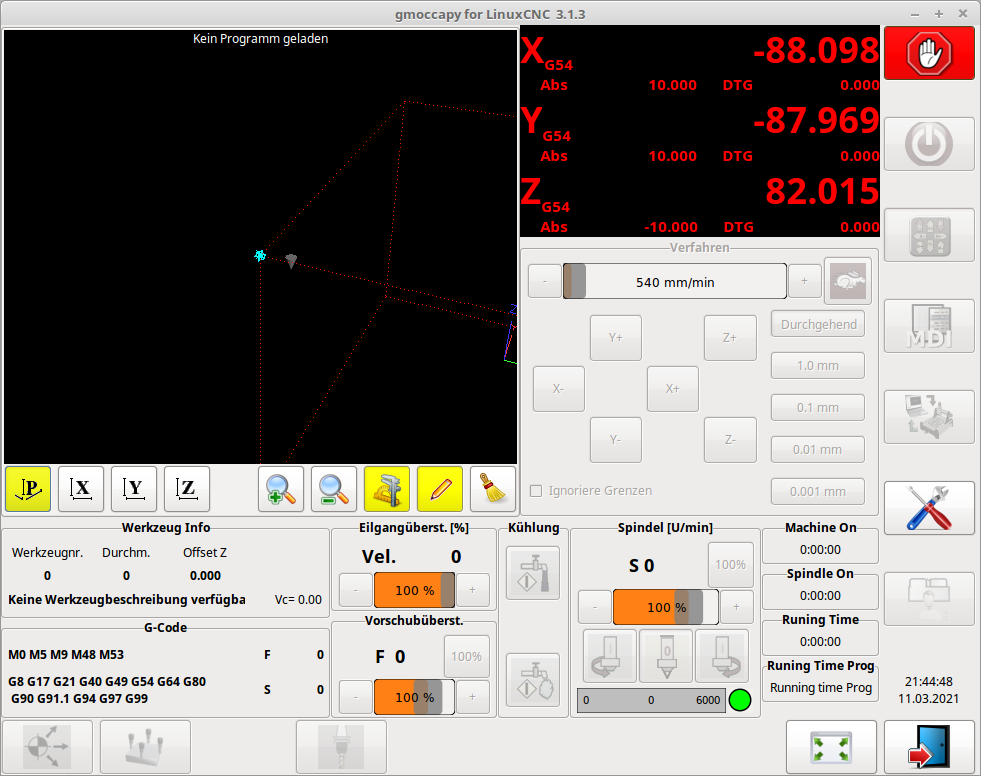
Did you want it to show like this?


By changing the entry in the load part of the INI File you changed the component names, so all hal pin aren not any more called timer, but timer_4

I changed the hal pin names and now it does work
Code:
EMBED_TAB_NAME = timer EMBED_TAB_LOCATION = ntb_setup EMBED_TAB_COMMAND = gladevcp -x {XID} -u timer_hu.py -H timer_4.hal timer_4.glade

If we do not specify a component name, the name of the glade file will be taken.

Norbert
The following user(s) said Thank You: tivoi, HansU

Please Log in or Create an account to join the conversation.
More
5 years 7 months ago #201878 by HansU
Replied by HansU on topic gmocappy clock

newbynobi wrote: Did you want it to show like this?

Yes

newbynobi wrote: If we do not specify a component name, the name of the glade file will be taken.

That was the crucial hint. I didn't know that. If I only change the file name, then all works as expected!
Thanks so much Norbert!

Please Log in or Create an account to join the conversation.
More
5 years 7 months ago - 5 years 7 months ago #201950 by HansU
Replied by HansU on topic gmocappy clock
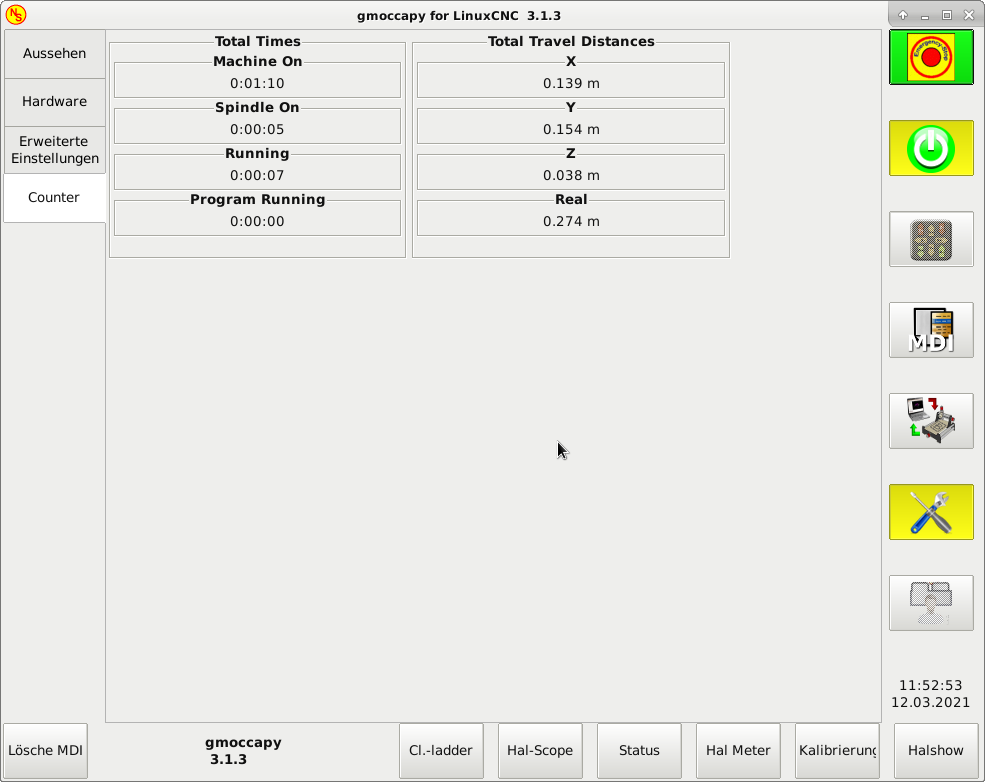
I added the travel distances to Norberts VCP:


and renamed it to counter as it does now more than time based counting.
But pay attention on if you already used the abs or integ HAL component in another hal file.
Only the columns are a bit strechted since a added a vbox around. Without the vbox was that correct (see counter_b.glade)
The calculation of the real travel distance was easier than my first approach when using the pin "motion.current-vel".
If someone has a better name for "Real" please tell me. I didn't want to use "Total" because it doesn't simply adds the travel distances of X, Y and Z.
The Program Running Time makes no sense in this location as you can only get there when the program is stopped. In this case the counter will be resetted and you will always see a zero. I let it in if someone wants it at another location.

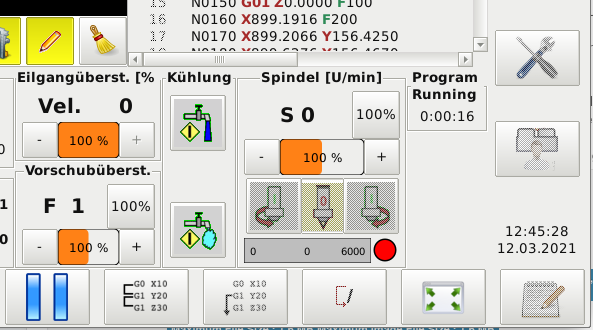
Therefore a added a separate VCP for the current program running to be displayed at the main screen like this:


I added it in the INI file in this way:
Code:
EMBED_TAB_NAME = Counter EMBED_TAB_LOCATION = ntb_setup EMBED_TAB_COMMAND = gladevcp -x {XID} -u counter.py -H counter.hal counter.glade EMBED_TAB_NAME = Timer EMBED_TAB_LOCATION = box_custom_4 EMBED_TAB_COMMAND = gladevcp -x {XID} -u programtimer.py -H programtimer.hal programtimer.glade

I'll add the files for the programtimer in another post because of the file number limitation.
Last edit: 5 years 7 months ago by HansU.

Please Log in or Create an account to join the conversation.

More
5 years 7 months ago #201951 by HansU
Replied by HansU on topic gmocappy clock
The files for the program timer...

Another thing I noticed while playing around:
Can you also grey out the stop button (like you already did with the play and pause button) when the program is already stopped?


Please Log in or Create an account to join the conversation.

More
5 years 7 months ago #202088 by newbynobi
Replied by newbynobi on topic gmocappy clock
@Hans

Thanks for your additions.
May I criticize you python code?

Do not use:
Code:
lbl_text = "%.3f m" % (travel)
but use:
Code:
lbl_text = "{0:.3f} m".format(travel)

Both are working formats, but the recommended one will it make more easy to transfer later to python3. And it is also faster and will not cause strange errors if you use tupple or list objekcts.

“The formatting operations described here exhibit a variety of quirks that lead to a number of common errors (such as failing to display tuples and dictionaries correctly).

Using the newer formatted string literals or the str.format() interface helps avoid these errors. These alternatives also provide more powerful, flexible and extensible approaches to formatting text.”


From Python Docu.

I will use part of your code ;-)
I will use my timer panel on custom Box 4 and you travel/counter panel on the setup page.

Thanks for contributing to linuxcnc and gmoccapy.

Norbert

Please Log in or Create an account to join the conversation.

More
5 years 7 months ago #202094 by HansU
Replied by HansU on topic gmocappy clock

newbynobi wrote:
Do not use:

Code:
lbl_text = "%.3f m" % (travel)
but use:
Code:
lbl_text = "{0:.3f} m".format(travel)
Both are working formats, but the recommended one will it make more easy to transfer later to python3. And it is also faster and will not cause strange errors if you use tupple or list objekcts.

Shame on me but I like C-style formatting :silly:

newbynobi wrote:
I will use part of your code ;-)
I will use my timer panel on custom Box 4 and you travel/counter panel on the setup page.

:)
How do you want to integrate it? Leave it as a VCP or make it part of the GUI? If latter please make it selectable, as the space on the main screen is valuable.

I think I'll add
- counters for "travel since lubrication"
- an alarm display on Box 4 and
- a reset button on Setup page when lubricated that resets the counter and alarm display.
Similiar to your alarm by time but without creating alarm and reset pins.

By the way: Is it possible to have multiple VCPs controlled by one python and one hal file?
In this example: Having only counter.py and counter.hal and two VCPs - one in Box4 and one in setup tab?

Please Log in or Create an account to join the conversation.

Moderators: newbynobi, HansU
Time to create page: 0.083 seconds
Powered by Kunena Forum