
- Configuring LinuxCNC
- Advanced Configuration
- Servo Wiring and Tuning detailed How To example Mesa 7i77.
Servo Wiring and Tuning detailed How To example Mesa 7i77.
- PCW
-
- Away
- Moderator
-

Less
More
- Posts: 18090
- Thank you received: 5323
14 Jan 2025 22:34 #318985
by PCW
Replied by PCW on topic Servo Wiring and Tuning detailed How To example Mesa 7i77.
If the machine uses mm units, 200m = 0.2 mm/division
and a velocity of 1 means 1mm/s
and a velocity of 1 means 1mm/s
The following user(s) said Thank You: tommylight, vre
Please Log in or Create an account to join the conversation.
- tommy
- Offline
- Premium Member
-

Less
More
- Posts: 106
- Thank you received: 3
25 Mar 2025 19:37 #324907
by tommy
Replied by tommy on topic Servo Wiring and Tuning detailed How To example Mesa 7i77.
I would need a bit of hint on my tuning of AC servos + 7i95t, as I cannot decrease those spikes on acceleration and deceleration, doesn't matter if I go higher or lower with FF2. On linear move there is f-error 0.001mm or less. Should I start adjusting parameters on diver?
Also if I "go crazy" with short presses on arrow keys for jog, especially with changing direction, f-error is all the way up to 1mm or more.
Captures below are taken during running some test g-code:
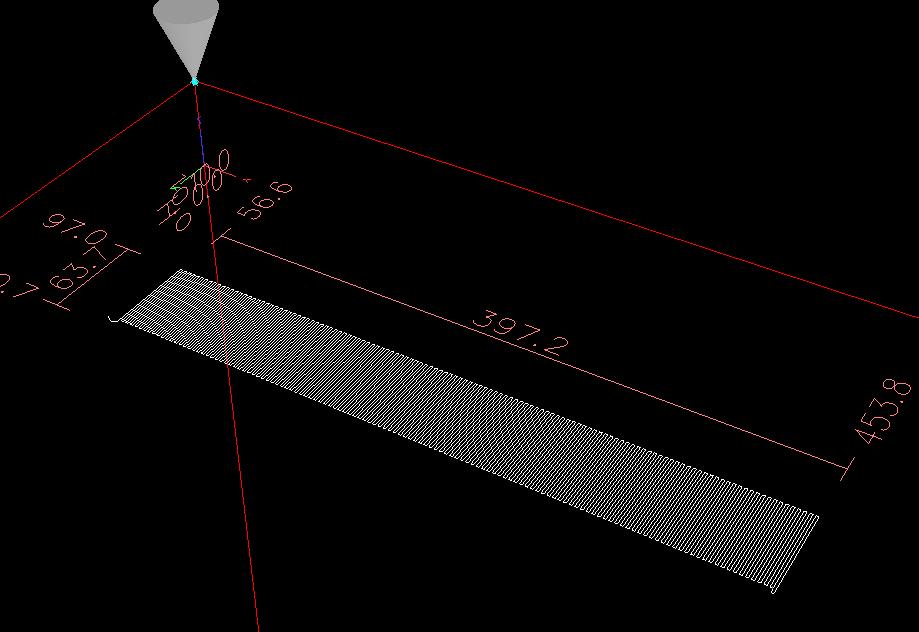
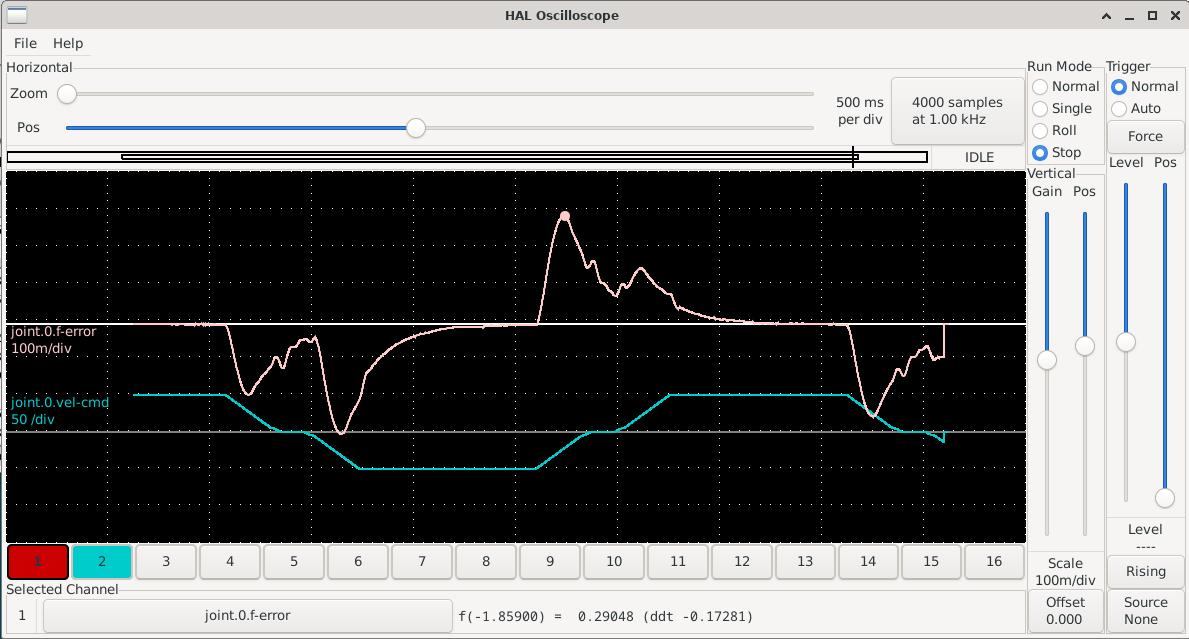
Also if I "go crazy" with short presses on arrow keys for jog, especially with changing direction, f-error is all the way up to 1mm or more.
Captures below are taken during running some test g-code:
Attachments:
Please Log in or Create an account to join the conversation.
- PCW
-
- Away
- Moderator
-
Less
More
- Posts: 18090
- Thank you received: 5323
25 Mar 2025 19:58 - 25 Mar 2025 20:01 #324908
by PCW
Replied by PCW on topic Servo Wiring and Tuning detailed How To example Mesa 7i77.
Are these step/dir servos with encoder feedback to LinuxCNC?
If so it seems there is significant delay from command to motion.
This may well be a drive tuning/setup issue. Maybe drive acceleration
set lower than LinuxCNCs setting or some other filtering or constraints
in the drive.
If so it seems there is significant delay from command to motion.
This may well be a drive tuning/setup issue. Maybe drive acceleration
set lower than LinuxCNCs setting or some other filtering or constraints
in the drive.
Last edit: 25 Mar 2025 20:01 by PCW.
Please Log in or Create an account to join the conversation.
- tommylight
-
 Topic Author
- Away
- Moderator
-
Less
More
- Posts: 21945
- Thank you received: 7471
25 Mar 2025 20:08 #324910
by tommylight
Replied by tommylight on topic Servo Wiring and Tuning detailed How To example Mesa 7i77.
If those are step/dir drives, you should be looking here:
forum.linuxcnc.org/10-advanced-configura...glass-scale-feedback
Also
dirsetup and dirhold to 20000
and stepspace and steplen to 5000
Untill you get things working properly, then you can lower the steplen and stepspace while testing to make sure there are no missed steps.
As you have them, chances are some steps are being missed by the drive so LinuxCNC keep upping the number of steps till it catches up.
-
Yes, i am aware the drive manual might say 200ns, but that is almost always not correct, except on very good quality drives.
forum.linuxcnc.org/10-advanced-configura...glass-scale-feedback
Also
dirsetup and dirhold to 20000
and stepspace and steplen to 5000
Untill you get things working properly, then you can lower the steplen and stepspace while testing to make sure there are no missed steps.
As you have them, chances are some steps are being missed by the drive so LinuxCNC keep upping the number of steps till it catches up.
-
Yes, i am aware the drive manual might say 200ns, but that is almost always not correct, except on very good quality drives.
Please Log in or Create an account to join the conversation.
- tommy
- Offline
- Premium Member
-
Less
More
- Posts: 106
- Thank you received: 3
25 Mar 2025 20:19 #324913
by tommy
Replied by tommy on topic Servo Wiring and Tuning detailed How To example Mesa 7i77.
Yes, it is step/dir driver.
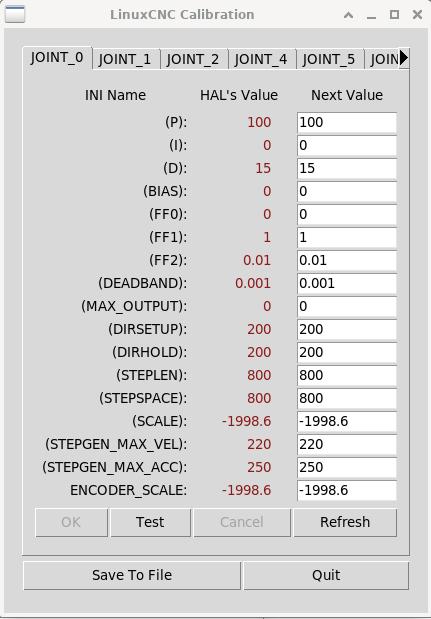
If it helps, here are .ini and .hal sections, related to this axis:
If it helps, here are .ini and .hal sections, related to this axis:
[AXIS_X]
MIN_LIMIT          = -1
MAX_LIMIT          = 1100
MAX_VELOCITY       = 170
MAX_ACCELERATION   = 200

[JOINT_0]
CARD               = 0
TAB                = 0
AXIS               = X
TYPE               = LINEAR
HOME               = 0.000
MAX_VELOCITY       = 170
MAX_ACCELERATION   = 200
#PID_MAX_VEL        = 10
BACKLASH           = 0.000
STEP_INVERT        = False
DIR_INVERT         = False
STEPGEN_MAX_VEL    = 220
STEPGEN_MAX_ACC    = 250
DIRSETUP           = 200
DIRHOLD            = 200
STEPLEN            = 800
STEPSPACE          = 800
SCALE              = -1998.6
ENCODER_SCALE      = -1998.6
MIN_LIMIT          = -1.0
MAX_LIMIT          = 1100
FERROR             = 10
MIN_FERROR         = 7
HOME_OFFSET        = -4.0
HOME_SEARCH_VEL    = -10
HOME_LATCH_VEL     = 2
HOME_USE_INDEX     = NO
HOME_IGNORE_LIMITS = YES
HOME_SEQUENCE      = 1
DEADBAND           = 0.001
P                  = 100
I                  = 0
D                  = 15
BIAS               = 0
FF0                = 0
FF1                = 1
FF2                = 0.01
MAX_OUTPUT         = 0
# PID Setup
setp pid.x.Pgain [JOINT_0](P)
setp pid.x.Igain [JOINT_0](I)
setp pid.x.Dgain [JOINT_0](D)
setp pid.x.bias [JOINT_0](BIAS)
setp pid.x.FF0 [JOINT_0](FF0)
setp pid.x.FF1 [JOINT_0](FF1)
setp pid.x.FF2 [JOINT_0](FF2)
setp pid.x.deadband [JOINT_0](DEADBAND)
setp pid.x.maxoutput [JOINT_0](MAX_OUTPUT)
#setp pid.x.error-previous-target True
# limit stepgen velocity corrections caused by position feedback jitter
#setp pid.x.maxerror [JOINT_0](MAX_ERROR)
# joint-0 enable chain
net x-index-enable <=> pid.x.index-enable
net x-enable => pid.x.enable
net x-output => pid.x.output
net x-pos-cmd => pid.x.command
net x-vel-fb => pid.x.feedback-deriv
net x-pos-fb => pid.x.feedback
# Joint 0 Step Gen signals/setup
setp hm2_[MESA](BOARD).0.stepgen.00.dirsetup [JOINT_0](DIRSETUP)
setp hm2_[MESA](BOARD).0.stepgen.00.dirhold [JOINT_0](DIRHOLD)
setp hm2_[MESA](BOARD).0.stepgen.00.steplen [JOINT_0](STEPLEN)
setp hm2_[MESA](BOARD).0.stepgen.00.stepspace [JOINT_0](STEPSPACE)
setp hm2_[MESA](BOARD).0.stepgen.00.position-scale [JOINT_0](SCALE)
setp hm2_[MESA](BOARD).0.stepgen.00.maxvel [JOINT_0](STEPGEN_MAX_VEL)
setp hm2_[MESA](BOARD).0.stepgen.00.maxaccel [JOINT_0](STEPGEN_MAX_ACC)
setp hm2_[MESA](BOARD).0.stepgen.00.step_type 0
setp hm2_[MESA](BOARD).0.stepgen.00.control-type 1
# ---closedloop stepper signals---
net x-pos-cmd joint.0.motor-pos-cmd
net x-output => hm2_[MESA](BOARD).0.stepgen.00.velocity-cmd
net x-enable joint.0.amp-enable-out => hm2_[MESA](BOARD).0.stepgen.00.enable
# ---Encoder feedback signals/setup---
setp hm2_[MESA](BOARD).0.encoder.00.counter-mode 0
setp hm2_[MESA](BOARD).0.encoder.00.filter 1
setp hm2_[MESA](BOARD).0.encoder.00.index-invert 0
setp hm2_[MESA](BOARD).0.encoder.00.index-mask 0
setp hm2_[MESA](BOARD).0.encoder.00.index-mask-invert 0
setp hm2_[MESA](BOARD).0.encoder.00.scale [JOINT_0]ENCODER_SCALE
net x-pos-fb <= hm2_[MESA](BOARD).0.encoder.00.position
net x-vel-fb <= hm2_[MESA](BOARD).0.encoder.00.velocity
net x-pos-fb => joint.0.motor-pos-fb
net x-index-enable joint.0.index-enable <=> hm2_[MESA](BOARD).0.encoder.00.index-enable
net joint-0-pos-rawcounts <= hm2_[MESA](BOARD).0.encoder.00.rawcountsPlease Log in or Create an account to join the conversation.
- tommy
- Offline
- Premium Member
-
Less
More
- Posts: 106
- Thank you received: 3
26 Mar 2025 17:57 #324992
by tommy
Replied by tommy on topic Servo Wiring and Tuning detailed How To example Mesa 7i77.
Rising up STEPGEN_MAX_ACC significantly, gave me much much better response, now I'm well below 0.01mm f-error during g-code run!

Attachments:
The following user(s) said Thank You: tommylight, ktm950adv
Please Log in or Create an account to join the conversation.
- besriworld
- Offline
- Platinum Member
-

Less
More
- Posts: 327
- Thank you received: 92
09 Feb 2026 02:56 #342688
by besriworld
Replied by besriworld on topic Servo Wiring and Tuning detailed How To example Mesa 7i77.
I am trying to configure the spindle as a C-axis, but I am having a problem and cannot find a solution.
Could someone please take a look at my configuration and the video and give me some advice?
I was not able to post this in the original lathe thread.
#########################
# AXIS C JOINT 2
#########################
setp pid.c.Pgain [JOINT_2](P)
setp pid.c.Igain [JOINT_2](I)
setp pid.c.Dgain [JOINT_2](D)
setp pid.c.bias [JOINT_2](BIAS)
setp pid.c.FF0 [JOINT_2](FF0)
setp pid.c.FF1 [JOINT_2](FF1)
setp pid.c.FF2 [JOINT_2](FF2)
setp pid.c.deadband [JOINT_2](DEADBAND)
setp pid.c.maxoutput [JOINT_2](MAX_OUTPUT)
setp pid.c.error-previous-target true
net c-index-enable => pid.c.index-enable
net c-enable => pid.c.enable
net c-pos-cmd => pid.c.command
net c-spindle-pos-fb => pid.c.feedback
net c-output <= pid.c.output
# ---PWM Generator signals/setup---
268 net c-output => hm2_7i98.0.pwmgen.00.value
269 net c-pos-cmd <= joint.2.motor-pos-cmd
270 net c-enable <= joint.2.amp-enable-out
271 # enable _all_ sserial pwmgens
272 #net c-enable => hm2_7i92.0.7i77.0.1.analogen
276 net c-spindle-pos-fb <= hm2_7i98.0.encoder.02.position
277 net c-spindle-vel-fb <= hm2_7i98.0.encoder.02.velocity
278 net c-spindle-pos-fb => joint.2.motor-pos-fb
279 #net c-index-enable joint.0.index-enable <=> hm2_7i92.0.encoder.06.index-enable
280 net c-pos-rawcounts <= hm2_7i98.0.encoder.02.rawcounts
282 # ---setup home / limit switch signals---
284 net c-home-sw => joint.2.home-sw-in
285 net c-neg-limit => joint.2.neg-lim-sw-in
286 net c-pos-limit => joint.2.pos-lim-sw-in
[AXIS_C]
MAX_VELOCITY = 360
MAX_ACCELERATION = 500
MIN_LIMIT = -900.0
MAX_LIMIT = 900.0
[JOINT_2]
TYPE = ANGULAR
HOME = 0.0
FERROR = 1000.0
MIN_FERROR = 500.0
MAX_VELOCITY = 360
MAX_ACCELERATION = 500
P = 0.0000001
I = 0.
D = 0.
FF0 = 0.98
FF1 = 0
FF2 = 0
BIAS = 0
DEADBAND = 0.1
MAX_OUTPUT = 10
ENCODER_SCALE = -40
OUTPUT_SCALE = 10
OUTPUT_MIN_LIMIT = -10
OUTPUT_MAX_LIMIT = 10
MIN_LIMIT = -1000
MAX_LIMIT = 1000
HOME_OFFSET = 0.0
HOME_SEQUENCE = 1
Could someone please take a look at my configuration and the video and give me some advice?
I was not able to post this in the original lathe thread.
#########################
# AXIS C JOINT 2
#########################
setp pid.c.Pgain [JOINT_2](P)
setp pid.c.Igain [JOINT_2](I)
setp pid.c.Dgain [JOINT_2](D)
setp pid.c.bias [JOINT_2](BIAS)
setp pid.c.FF0 [JOINT_2](FF0)
setp pid.c.FF1 [JOINT_2](FF1)
setp pid.c.FF2 [JOINT_2](FF2)
setp pid.c.deadband [JOINT_2](DEADBAND)
setp pid.c.maxoutput [JOINT_2](MAX_OUTPUT)
setp pid.c.error-previous-target true
net c-index-enable => pid.c.index-enable
net c-enable => pid.c.enable
net c-pos-cmd => pid.c.command
net c-spindle-pos-fb => pid.c.feedback
net c-output <= pid.c.output
# ---PWM Generator signals/setup---
268 net c-output => hm2_7i98.0.pwmgen.00.value
269 net c-pos-cmd <= joint.2.motor-pos-cmd
270 net c-enable <= joint.2.amp-enable-out
271 # enable _all_ sserial pwmgens
272 #net c-enable => hm2_7i92.0.7i77.0.1.analogen
276 net c-spindle-pos-fb <= hm2_7i98.0.encoder.02.position
277 net c-spindle-vel-fb <= hm2_7i98.0.encoder.02.velocity
278 net c-spindle-pos-fb => joint.2.motor-pos-fb
279 #net c-index-enable joint.0.index-enable <=> hm2_7i92.0.encoder.06.index-enable
280 net c-pos-rawcounts <= hm2_7i98.0.encoder.02.rawcounts
282 # ---setup home / limit switch signals---
284 net c-home-sw => joint.2.home-sw-in
285 net c-neg-limit => joint.2.neg-lim-sw-in
286 net c-pos-limit => joint.2.pos-lim-sw-in
[AXIS_C]
MAX_VELOCITY = 360
MAX_ACCELERATION = 500
MIN_LIMIT = -900.0
MAX_LIMIT = 900.0
[JOINT_2]
TYPE = ANGULAR
HOME = 0.0
FERROR = 1000.0
MIN_FERROR = 500.0
MAX_VELOCITY = 360
MAX_ACCELERATION = 500
P = 0.0000001
I = 0.
D = 0.
FF0 = 0.98
FF1 = 0
FF2 = 0
BIAS = 0
DEADBAND = 0.1
MAX_OUTPUT = 10
ENCODER_SCALE = -40
OUTPUT_SCALE = 10
OUTPUT_MIN_LIMIT = -10
OUTPUT_MAX_LIMIT = 10
MIN_LIMIT = -1000
MAX_LIMIT = 1000
HOME_OFFSET = 0.0
HOME_SEQUENCE = 1
Please Log in or Create an account to join the conversation.
- tommylight
-
Topic Author
- Away
- Moderator
-
Less
More
- Posts: 21945
- Thank you received: 7471
09 Feb 2026 03:09 #342689
by tommylight
Replied by tommylight on topic Servo Wiring and Tuning detailed How To example Mesa 7i77.
Why?P = 0.0000001
I = 0.
D = 0.
Please Log in or Create an account to join the conversation.
- besriworld
- Offline
- Platinum Member
-
Less
More
- Posts: 327
- Thank you received: 92
09 Feb 2026 04:33 - 09 Feb 2026 11:30 #342693
by besriworld
Replied by besriworld on topic Servo Wiring and Tuning detailed How To example Mesa 7i77.
If you have time, please watch the video.
Even with a very small P value, the axis starts to oscillate.
PS. I understand that Linuxcnc is fighting with the internal PID controller of the servo driver.
Even with a very small P value, the axis starts to oscillate.
PS. I understand that Linuxcnc is fighting with the internal PID controller of the servo driver.
Last edit: 09 Feb 2026 11:30 by besriworld.
Please Log in or Create an account to join the conversation.
- tommylight
-
Topic Author
- Away
- Moderator
-
Less
More
- Posts: 21945
- Thank you received: 7471
09 Feb 2026 14:14 #342711
by tommylight
Replied by tommylight on topic Servo Wiring and Tuning detailed How To example Mesa 7i77.
Remove the dots after the 0 for I and D.
From video, definitely something wrong, but no idea what, that is not normal oscillation as it is moving way to much back and forth.
Do some plots using halscope for command and f-error
From video, definitely something wrong, but no idea what, that is not normal oscillation as it is moving way to much back and forth.
Do some plots using halscope for command and f-error
Please Log in or Create an account to join the conversation.
- Configuring LinuxCNC
- Advanced Configuration
- Servo Wiring and Tuning detailed How To example Mesa 7i77.
Time to create page: 0.956 seconds