

- Posts: 6803
- Thank you received: 2181
qt_dragon_hd - manual tool change and remap
3 years 1 month ago #280697
by cmorley
Replied by cmorley on topic qt_dragon_hd - manual tool change and remap
Thank you for the feedback. I will try to incorporate the jest of your observations into the docs.
I believe the originator of this technique was using small endmills on a router, so the tool tips always touched the probe without offsetting.
In the future maybe we could use the diameter in the tool table to offset the tool from the probe.
better yet might be to utilize the newer tool data base to add entries such as tool probe offset.
I'm glad you have got this far - please keep up the feedback.
Chris
I believe the originator of this technique was using small endmills on a router, so the tool tips always touched the probe without offsetting.
In the future maybe we could use the diameter in the tool table to offset the tool from the probe.
better yet might be to utilize the newer tool data base to add entries such as tool probe offset.
I'm glad you have got this far - please keep up the feedback.
Chris
The following user(s) said Thank You: Vector
Please Log in or Create an account to join the conversation.

3 years 1 month ago - 3 years 1 month ago #280724
by Vector
Replied by Vector on topic qt_dragon_hd - manual tool change and remap
Thanks for your help! I apparently need a lot of it image missing /media/kunena/emoticons/sad.png
Is tool change supposed to return to the original location where the tool change was called?
Or is that the responsibility of the G-code that called the tool change?
(I exported from FreeCAD, and it does not return it to the start point... it seems to assume once M6 T2 and G43 H2 are issued, it's good to go M3 S3000 and head straight down... very scary after the tool change finished and it turned on the spindle and then just dived straight down toward the tool setter with the cutter whirring away).
Is there a guide on how to use the step through feature in the MDI window? I'm wondering if I have to put in special comments or something.
Thanks again!
Is tool change supposed to return to the original location where the tool change was called?
Or is that the responsibility of the G-code that called the tool change?
(I exported from FreeCAD, and it does not return it to the start point... it seems to assume once M6 T2 and G43 H2 are issued, it's good to go M3 S3000 and head straight down... very scary after the tool change finished and it turned on the spindle and then just dived straight down toward the tool setter with the cutter whirring away).
Is there a guide on how to use the step through feature in the MDI window? I'm wondering if I have to put in special comments or something.
Thanks again!
Last edit: 3 years 1 month ago by Vector. Reason: Forgot most of the message.
The following user(s) said Thank You: tommylight
Please Log in or Create an account to join the conversation.
3 years 1 month ago #280792
by Vector
Replied by Vector on topic qt_dragon_hd - manual tool change and remap
I should have attached files. Here's the configuration and the Gcode file.
Please Log in or Create an account to join the conversation.
3 years 1 month ago #280799
by cmorley
Replied by cmorley on topic qt_dragon_hd - manual tool change and remap
after probe finishes it ONLY moves to [CHANGE_TOOL] Z position.
If you wish to move back to [CHANGE_TOOL] in X and Y, you would need to change qt_auto_probe_tool after this line:
github.com/LinuxCNC/linuxcnc/blob/2.9/nc...o_probe_tool.ngc#L77
something like:
G53 G0 X[#<_ini[CHANGE_POSITION]X>] Y[#<_ini[CHANGE_POSITION]Y>]
What do you mean by step through in MDI?
If you wish to move back to [CHANGE_TOOL] in X and Y, you would need to change qt_auto_probe_tool after this line:
github.com/LinuxCNC/linuxcnc/blob/2.9/nc...o_probe_tool.ngc#L77
something like:
G53 G0 X[#<_ini[CHANGE_POSITION]X>] Y[#<_ini[CHANGE_POSITION]Y>]
What do you mean by step through in MDI?
The following user(s) said Thank You: Vector
Please Log in or Create an account to join the conversation.
3 years 1 month ago #280814
by Vector
Replied by Vector on topic qt_dragon_hd - manual tool change and remap
Got it!
I'm going to crack the seal on qt_auto_probe_tool and make an additional change to the one you suggest....
I'll answer your question about my question about Step through on the MDI in a second post so as not to clutter this one more than it will be... because....
...if you have time... I have a few questions:
Is having the M6 remap code not return to the point where the tool change was called the normal way?? Is it advisable?
(Discussion research follows:)
In the Axis Sim , I think they "move back to toolchange position: z, then xy," ie, at least they go back to tool change, but not back to the workpiece.
At PrintNC , their solution involves two files, but the philosophy in their tool-change.ngc is to go all the way back "to the original position," ie, back to the workpiece
This thread by orangecat also seems to have been picked up by PrintNC and others and seeks to return to the original workpiece.
I don't have a link, but don't auto-tool-changer remaps complete the journey back to the workpiece?
So, would it be a valid idea to have us move all the way to the workpiece? Wouldn't that be desirable?
I'm going to work on that tonight, and I'll post back what I find... I'm happy to do the github work as well, but I don't want to step on any toes, so if I should just post here for someone more experienced to PR it, or if it's anti-qtDragon philosophy, then no worries.
I think the work by orangecat and PrintNC was before local and global variables were added to ngc, so their code was maintenance heavy: but it was nine years ago!
I'm going to crack the seal on qt_auto_probe_tool and make an additional change to the one you suggest....
I'll answer your question about my question about Step through on the MDI in a second post so as not to clutter this one more than it will be... because....
...if you have time... I have a few questions:
Is having the M6 remap code not return to the point where the tool change was called the normal way?? Is it advisable?
(Discussion research follows:)
In the Axis Sim , I think they "move back to toolchange position: z, then xy," ie, at least they go back to tool change, but not back to the workpiece.
At PrintNC , their solution involves two files, but the philosophy in their tool-change.ngc is to go all the way back "to the original position," ie, back to the workpiece
This thread by orangecat also seems to have been picked up by PrintNC and others and seeks to return to the original workpiece.
I don't have a link, but don't auto-tool-changer remaps complete the journey back to the workpiece?
So, would it be a valid idea to have us move all the way to the workpiece? Wouldn't that be desirable?
I'm going to work on that tonight, and I'll post back what I find... I'm happy to do the github work as well, but I don't want to step on any toes, so if I should just post here for someone more experienced to PR it, or if it's anti-qtDragon philosophy, then no worries.
I think the work by orangecat and PrintNC was before local and global variables were added to ngc, so their code was maintenance heavy: but it was nine years ago!
Please Log in or Create an account to join the conversation.
3 years 1 month ago #280815
by Vector
Replied by Vector on topic qt_dragon_hd - manual tool change and remap
By stepping through the MDI, I'm probably naming things wrong...
I meant in this part of the interface, it looks like I should be able, after I load a file from disk with g-code or ngc code, etc, to press Cycle Start but have some control to prevent it from immediately processing all the way to the end...
IE, those 'greyed out' Pause and Step buttons... how do I use them?
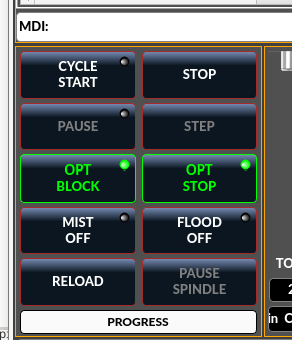
I meant in this part of the interface, it looks like I should be able, after I load a file from disk with g-code or ngc code, etc, to press Cycle Start but have some control to prevent it from immediately processing all the way to the end...
IE, those 'greyed out' Pause and Step buttons... how do I use them?
Please Log in or Create an account to join the conversation.
Moderators: cmorley
Time to create page: 0.175 seconds